
Voter ID Card is an identity card issued by the Election Commission of India to citizens who are eligible to vote (above 18 years old). It has the person’s name, photograph, date of birth, gender, and address. The main purpose of the card is to allow a person to vote during elections and also to serve as proof of identity and address. It can also be used as general identity proof at places if asked.
E-Voter ID Card (Digital Voter ID)
E-Voter ID Card, also known as Digital Voter ID, is the electronic version of the physical voter ID card. It is provided in PDF format and can be downloaded on a mobile phone or computer anytime anywhere . It has the same details as the physical card, is equally valid, and can be stored on devices or in DigiLocker for easy use.
THINGS YOU NEED TO DOWNLOAD VOTER ID CARD:
- EPIC Number (the number printed on your physical voter ID, or the reference number you got after applying for voter id card).
- Registered Mobile Number (must be linked with your voter ID record, because OTP will be sent here).
- Internet Access (through NVSP portal or Voter Helpline app).
- Password to open PDF (first 4 letters of your name in CAPITAL + year of birth, e.g., ANSH2004).

- First login using you register mobile number.
- Then go to the E-EPIC download.

- You can download your voter id card through EPIC number or from Reference number, enter waht you have and select your state and click on search.

- Your detail will show on screen and then scroll down there will will an option of send OTP to your registered mobile number for authentication.
- After verifying DOWNLOAD EPIC will show click on that you VOTER ID pdf will be downloaded to your device.
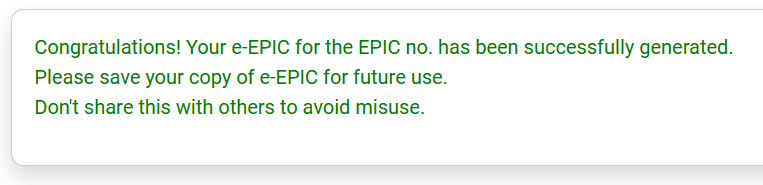
- After download this message will show.
STEPS TO DOWNLOAD VOTER ID CARD :
Visit NVSP or Voter Helpline App
– Go to the National Voters’ Service Portal https://voters.eci.gov.in/ or download the official Voter Helpline App
Login/Register
– Create an account or log in with your registered mobile number and password/OTP.
Go to “Download e-EPIC” Option
– e-EPIC = Electronic Electoral Photo Identity Card.
– Choose this service from the dashboard.
Enter EPIC Number or Reference Number
– Type your voter ID number (EPIC) or the form reference number if you just applied.
OTP Verification
– An OTP will be sent to your registered mobile number → Enter it.
Download E-Voter ID (PDF)
– After verification, you can download the digital voter ID card (e-EPIC) in PDF format.
– The PDF is password-protected (usually the first four letters of your name + year of birth).
Other Ways to Download E-Voter ID
- Voter Helpline Mobile App
– Install the app → Login → Go to Download e-EPIC → Enter EPIC number → OTP → Download card.https://play.google.com/store/apps/details?id=com.eci.citizen - DigiLocker
– Link your DigiLocker account with Aadhaar → Search for Election Commission documents → Fetch voter ID digitally. - From Registered Email/SMS (if new registration)
– Sometimes, after new voter registration, a download link for e-EPIC is sent to your email/SMS.
APPLY FOR VOTER ID CARD :
Things Needed Applying for Voter ID (All Forms)
Before applying, keep these ready:
- Passport-size photo.
- Age proof (for new voters in Form 6).
- Address proof (Aadhaar, Ration card, Driving License, Electricity/Water bill, etc.).
- Mobile number & Email ID (to receive OTPs and updates).
- For Form 7 – proof/reason for deletion (death certificate, migration proof, etc.).
- For Form 8 – documents supporting corrections (educational certificates, Aadhaar, etc.).
Applying for a New/Change in Voter ID Card
There are 3 main forms used for different purposes. Here’s the clear breakdown:
Form 6 – For New Voter Registration
Who should fill this form?
- Anyone who has just turned 18 years old.
- Anyone who will turn 18 in the coming few months (before the next election).
- Those who were never registered as a voter earlier.
How to apply (Form 6):
- Visit this portal https://voters.eci.gov.in/
Choose “Apply online for registration of new voter.” - Fill Form 6 with details like name, date of birth, address, etc.
- Upload documents:
- Age proof (Birth certificate / 10th mark sheet / Passport / Aadhaar etc.)
- Address proof (Ration card / Electricity bill / Aadhaar / Driving license etc.)
- Passport-size photo.
- Submit the form → You will get a reference number to track your application.
- Once verified, you’ll receive your EPIC number and later can download your e-Voter ID or get a physical card.
- Login to page.

- Then new voter registration and chose FILL FORM-6. Assuming you are 18 or above or you will turn 18 in few month.

- Fill all the information correctly.
- Here you have to select your state and district and click on next.


- Enter your first name and middle name in the first box and surname/tittle in the second box. below the box your hindi name will appear if you found mistake you can manually edit it by clicking on the keyboard icon.
- Then upload your passport size photo, it should be clear and face is properly visible in that photo remember there is nothing on your face that cover/hide/block your face, your application may got rejected.
- Then click on next.

- In the section c you have to give the detail of any one of the family member.
- select relation and then name of that person.’

- Give your mobile number and email address. If the mobile number and email belongs to you then select “self” either wise select other option.

- If you have aadhar then select “aadhar number” or if you don’t then select other option.

- Select your gender (male/female/third gender).

- Fill your DOB(date of birth).
- Then select “document for proof of Date Of Birth” give any document (government verified id proof ), by clicking on “select document” and select your document type. Eg :- aadhar card, pen card, birth certificate, other.
- Upload a photo of the selected document. Do not upload a password-protected PDF, otherwise your application may be rejected. If you see an error while uploading the photo, or if the site does not accept the selected photo, check the file size. It should be under 2 MB. Also, rename the photo with the document type you selected.

- Fill your address and all the detail.
- Then select “document for proof of residence” and upload the the selected document.

- This section is for disable person other can skip this.

- Give the details of any one family member with whom you live (parent/guardian) and who already has a voter ID. This will make the verification easier.

- In the declaration section, first write your village or town, then select your state and district.
- Next, mention how many years you have been living at the address you provided above.
- Finally, write the name of your place.

- Fill the given captcha.
- After filling the captcha click on the “send otp”.
- Then click on the Preview and Submit button.
- A page will pop up check every detail and if you found any mistake then edit it and there is no mistake click on the submit button.
- Then a new page will open and Download Acknowledgement for the further detail.
TRACK YOUR APPLICATION STATUS
- Login to page by your register mobile number.
- After registration you will get an tracking id copy and paste in the box and you will get the update.
SEARCH YOUR IN VOTER LIST
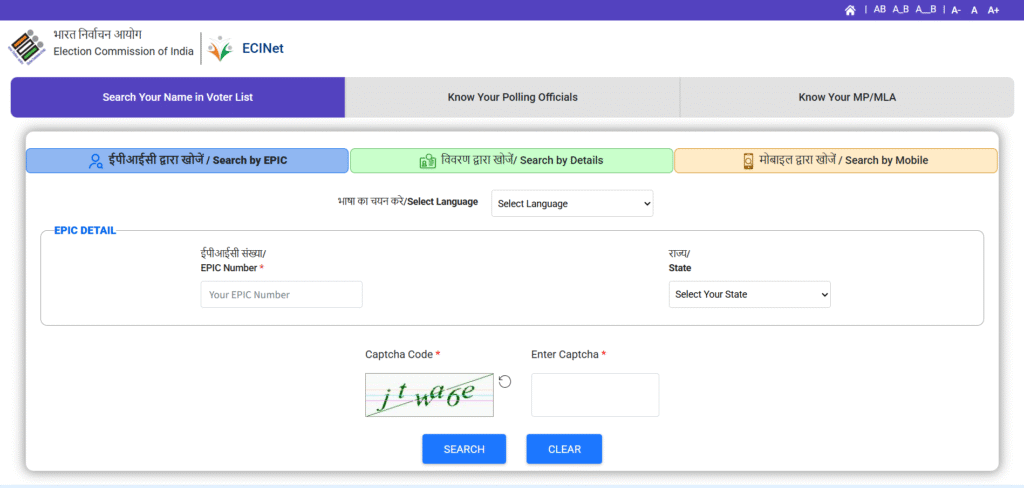
- Enter your EPIC number and your state.
- Fill the captcha and enter search, you will get the list.
Form 7 – For Objecting or Deleting a Name from Voter List
Who should fill this form?
- If someone’s name is wrongly included in the voter list.
- If a person has died or shifted permanently to another constituency.
- If your own name is appearing in the wrong place and you want it removed.
How to apply (Form 7):
- Go to NVSP portal or Voter Helpline app.
- Select “Object/Remove name from electoral roll.”
- Fill Form 7 giving details of the entry to be deleted (person’s name, relation, reason).
- Upload supporting documents (like death certificate, address proof of new residence, etc. if applicable).
- Submit → The Electoral Office will verify and remove the entry.
Form 8 – For Correction or Updating Existing Voter ID
Who should fill this form?
- If you already have a Voter ID but want to correct details (spelling mistake, wrong date of birth, wrong address).
- If you’ve shifted to a new address within the same constituency.
- If you want to update a photo.
How to apply (Form 8):
- Go to NVSP portal or Voter Helpline app.
- Choose “Correction of entries in electoral roll.”
- Fill Form 8 with corrected information.
- Upload valid documents as proof (like Aadhaar, passport, school certificate, utility bill, etc.).
- Submit → After verification, your voter ID details will be updated.